
More monitoring doesn’t automatically mean more safety. Technology for monitoring seniors at home can flag falls, changes in daily activity, or health readings, but its accuracy depends on what it measures and whether someone can respond to an alert. It can support care and independence, but it can’t replace personal attention.
It’s understandable to want a clearer picture of how a loved one is doing while respecting their privacy. This guide explains what home monitoring can and can’t tell you, how camera-free sensors work, and what to consider when choosing technology for an older adult’s needs.
You’ll also learn how Wi-Fi, cellular connections, and subscription costs can affect day-to-day use, and how monitoring can complement in-home care. The goal is to help you weigh technology as one part of a thoughtful support plan, centered on the person’s routines, preferences, and dignity.
Key Takeaways
- Match the monitor to the kind of support needed: automatic fall detection and a help button work in different ways.
- Camera-free sensors can offer insight into daily routines while keeping video out of private spaces.
- Before choosing a system, consider whether it relies on home Wi-Fi or cellular service and what ongoing fees may apply.
- Monitoring alerts are most useful when a caregiver has a clear role in responding to changes.
- Technology can support safer routines, but personal care and companionship remain important parts of in-home support.
Are remote health monitors accurate for home use?
Technology for monitoring seniors at home can track activity, health readings, or possible emergencies, but accuracy depends on what each device measures. Choose a system suited to the senior’s needs, place sensors according to the instructions, and test how alerts reach caregivers or emergency contacts.
Fall Detectors and Medical Alert Devices
A fall detector senses a hard impact or sudden change in movement and can send an alert without the wearer pressing a button. A medical alert device usually lets the wearer press a button to request help. This difference matters if someone can’t reach or use a button after a fall.
Medical alert systems commonly combine a wearable button or pendant, a base station, and access to a call center. Some can also notify emergency responders or health care professionals. The alert pathway matters: an automatic signal can prompt a response, while a manual button depends on the wearer being able to activate it.
Neither type tells a caregiver exactly what happened. A fall detector identifies a movement pattern, not the severity of an injury, and a button press signals a request for help without explaining the situation. If medication routines are also a concern, a fall alert doesn’t confirm whether a dose was taken.
Home Safety Sensors and Emergency Alerts
Home safety sensors track specific events, such as movement, a door opening, or activity near a bed. They’re most useful when matched to a clear concern, such as noticing a change in a familiar routine or receiving an alert when activity is detected in a monitored area.
Coverage varies by device and placement. For example, a wireless caregiver motion sensor listing describes a detection area of 16.4 feet by 110 degrees. That figure applies to the listed sensor, not every motion detector. Furniture, room layout, and sensor direction affect which areas it can detect.
Before relying on an emergency alert, identify who receives it and what happens next. A system may notify a designated support person, while some emergency-response systems connect to a call center. Depending on its features, technology for monitoring seniors at home may also require connectivity or a subscription.
Dementia Support Through Safe-Zone Alerts
A safe-zone alert uses location information to notify a support person when a senior moves beyond a defined area. Some monitoring systems use GPS locators to track a senior’s location. This can support dementia care when someone may leave home or move away from a familiar place.
Location information shows where a person is, not why they moved or whether they need help. A caregiver still needs a response plan that identifies who receives the notice and how they’ll make contact. A location alert isn’t a substitute for personal supervision when someone needs direct support.
To choose and install a system, start with the main concern, such as falls, wandering, or changes in home activity. Select a sensor or wearable designed for that need, install it according to the instructions, and test the alert with its intended recipient. Review the setup as routines and care needs change.
Camera-free motion monitoring and privacy
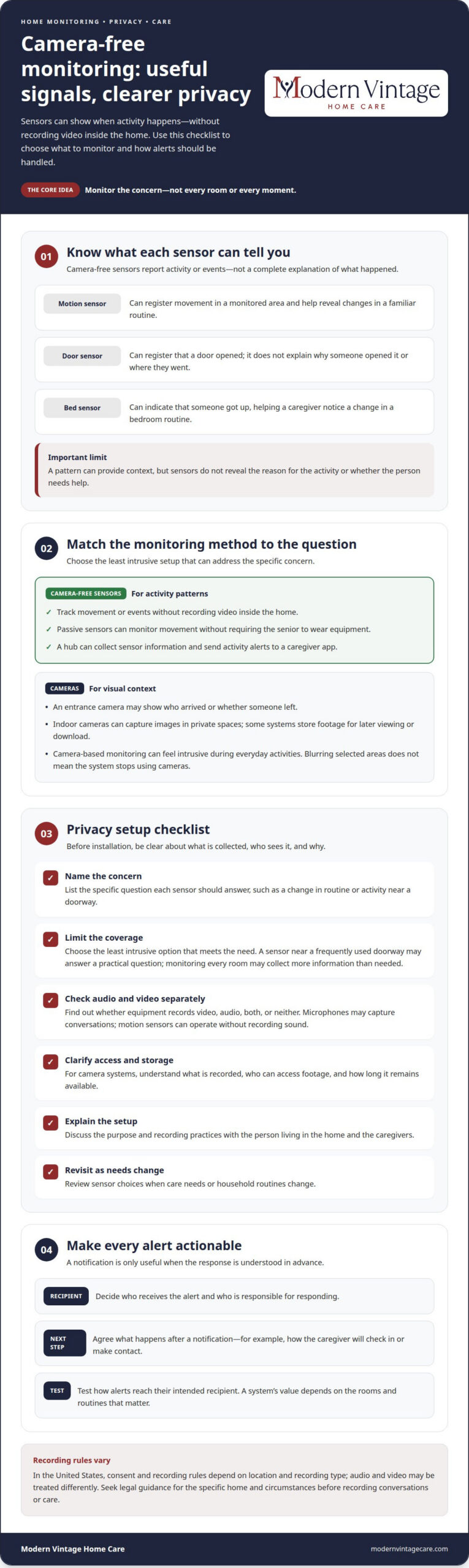
Camera-free motion monitoring uses sensors to track activity without recording video inside the home. It can show patterns, such as movement through a hallway or a change in a bedroom routine, giving caregivers useful context while protecting visual privacy. For families seeking peace of mind without continuous images, it offers a different balance.
Motion, door, and bed sensors can record when activity occurs, not what a person looks or sounds like. For example, a doorway sensor may register a door opening, while a bed sensor can show that someone got up. Patterns may help a caregiver notice a change from the person’s usual routine, but they don’t explain the reason.
A camera-free setup can be part of a smart home, with a hub collecting sensor information and sending activity alerts to a caregiver app. Its value depends on which rooms and routines matter. A sensor near a frequently used doorway may answer a practical question, while monitoring every room can collect more information than a family needs.
Home security cameras and video doorbells serve a different purpose. A camera at an entrance may show who arrived or whether someone left, while indoor cameras can capture images in private spaces. Some systems store footage for later viewing or download, so families should understand what is recorded, who can access it, and how long it remains available.
Camera-based monitoring may give a caregiver visual context, but it can also feel intrusive during everyday activities. Some systems can blur selected areas, though they still use cameras. A wearable avoids filming rooms, while passive sensors can monitor movement without requiring the senior to wear equipment.
Microphones deserve separate consideration from cameras. A device with audio features may capture conversations, while motion sensors can operate without recording sound. Before installing equipment, find out whether it records video, audio, both, or neither, and explain its purpose to the person living in the home.
In the United States, consent and recording rules depend on the location and type of recording; audio and video may be treated differently. Discuss the setup with the senior and caregivers, make recording practices clear, and seek legal guidance for the specific home and circumstances before recording conversations or care.
For a practical privacy review, list the concern each sensor addresses, choose the least intrusive option that meets it, and decide who receives alerts or footage. A motion sensor may suit changes in routine, while a camera may be more appropriate at an exterior entrance. Revisit those choices when care needs or household routines change.
Remote monitoring and caregiver peace of mind
Remote monitoring can share activity alerts with family members who aren’t at home. Its practical value depends on who receives each notice and how caregivers communicate afterward.
Caregiver Notifications and Communication
Monitoring notifications send information about a detected event or change to a caregiver’s phone or tablet. This can help a family member respond while away, rather than relying only on an alarm at home.
Set a clear response routine: decide who receives an alert, who follows up, and how the family shares what happened. For example, a door alert could prompt one caregiver to call the senior and then update relatives through an agreed channel. Without that handoff, family members may assume someone else has responded.
Dashboards and Family Updates
A caregiver dashboard gathers monitoring information, such as activity alerts, in one view. It can help family members follow changes without treating every notification as an emergency.
Use the dashboard to discuss patterns, not draw conclusions from a single alert. If a familiar morning activity appears later than usual, a caregiver can check in and share the outcome with relatives. Shared updates can keep communication consistent, especially when several people help with care.
Some systems also send medication or daily routine reminders. A reminder is a prompt, not proof that the senior took medication or completed a task. Families can use it to guide a conversation while keeping follow-up responsibilities clear.
Aging in Place and Caregiver Support
Remote tools can support aging in place by helping caregivers stay informed while a senior remains at home. In a 2024 AARP report, 75% of surveyed Americans ages 50 and older said they planned to age at home.
That makes communication especially important. A senior living with dementia, for example, may benefit from familiar routines and attentive support, while family members need a practical way to share observations. Remote alerts can add information, but they don’t provide hands-on help or replace direct conversation.
Smart smoke and carbon monoxide monitors can notify family members when they’re away. Those alerts may help relatives recognize a household concern, while activity notifications can point to changes in daily patterns. Each type serves a different purpose, so caregivers should understand what an alert means before deciding how to respond.
Agree on a simple family communication plan: name the primary alert recipient, choose a backup, and decide where updates belong. For instance, one relative can make the initial call, then post a brief update for others. This reduces duplicate calls and helps everyone understand what has happened.
When dementia or changing routines make daily support more involved, monitoring information can help caregivers notice where extra attention may be useful. The next step is a human response: checking in, sharing relevant changes, and adjusting support to the senior’s needs.
Wi-Fi, cellular plans, and subscription costs
Monitoring devices need a reliable way to send activity information and alerts. The connection type and any recurring fees affect whether a setup suits the home.
Device Compatibility and Subscription Costs
Device compatibility means sensors, hubs, and caregiver tools can communicate through the same supported connection. It matters because a motion sensor that detects movement but can’t reach its hub may not deliver an alert.
Some devices rely on home Wi-Fi; others use cellular service. Cellular monitoring can reduce reliance on home internet, smartphones, Bluetooth pairing, or Wi-Fi setup. It may suit a household without dependable internet, while a Wi-Fi system may fit a connected home.
Before choosing, map the components: sensor, hub, internet or cellular connection, and caregiver app. For example, a door sensor may need a compatible hub before it can send an alert to a family member’s phone.
System Pricing and Subscriptions
A monitoring system’s cost can include equipment and recurring fees for services such as data storage, caregiver dashboards, or emergency response. Understanding these components matters because the device price alone may not reflect ongoing costs.
Compare what each subscription includes. A plan for stored data differs from one that supports emergency response, and a dashboard may also require a recurring fee. Match paid features to the household’s needs instead of assuming every device includes the same services.
Build a simple cost picture by separating one-time equipment expenses from recurring charges. Include each sensor, hub, cellular plan if required, data storage, and alert or response service. This makes it easier to see which expenses continue even when the senior’s routine stays unchanged.
Also consider what happens when a connection fails. A Wi-Fi device may stop sending remote alerts if the home internet goes down, while cellular equipment uses its own data connection. The connection type affects how the system stays connected, not whether a sensor detects movement accurately.
Medicare, Medicaid, and private insurance don’t provide one universal coverage answer for every monitoring device or subscription. Coverage depends on the specific plan and whether the equipment or service fits its covered benefits, so don’t assume connectivity or recurring fees are included.
Separate hardware, connectivity, and service costs when reviewing coverage. For example, a plan might treat a monitoring device differently from its cellular service or emergency-response subscription. Identifying each item makes the coverage question more specific and helps families understand which expenses remain theirs.
Finally, consider who manages the account. If a family member receives alerts, that person may need app access and a compatible phone or tablet. Practical fit also depends on the connected devices, ongoing subscription, and household’s ability to maintain the setup.
Technology alongside professional in-home care
Home technology can support daily safety, but it doesn’t replace hands-on care. Its strongest role is helping older adults remain independent while giving caregivers useful information for timely support.
A motion sensor can switch on a hallway light when it detects movement, making a nighttime route easier to see. A bed sensor may show changes in overnight activity, while a reminder device can prompt a familiar medication routine. These tools assist with specific tasks; they don’t provide personal help with dressing, meals, or mobility.
Medication technology also has a defined role. A dispensing device can provide a scheduled dose and alert a caregiver when a dose is missed. That notice gives someone an opportunity to follow up, but it doesn’t explain why the dose was missed or replace medication support from a qualified care team.
Remote patient monitoring can collect readings such as blood pressure, weight, oxygen saturation, or glucose. For an adult living with a long-term condition, those measurements may help show changes over time. A reading alone doesn’t improve care: someone needs to interpret relevant information and decide whether a response is needed.
Professional caregivers can use monitoring information to shape daily tasks. For example, a change in movement could prompt closer attention during a morning routine, while repeated medication reminders may highlight a need for more support. Technology helps direct attention; a caregiver provides observation, conversation, and practical assistance.
Care plans work best when monitoring matches the person’s condition and goals. A system focused on activity may suit one routine, while a clinician-led program tracking blood pressure or glucose may support a different need. When health information is involved, it should fit the care team’s workflow so relevant readings reach people able to act.
Camera-free sensors can support routines without recording images, while cameras provide visual information but may feel intrusive. The right choice depends on the senior’s preferences and the care task. For instance, a light sensor may help with a dark hallway without monitoring private daily activities.
After a hospital discharge, remote monitoring combined with care management may provide additional clinical oversight. At home, technology can support safer routines, while a professional caregiver offers direct help and responds to changing needs. Neither alerts nor devices replace the human connection that makes support personal.
If daily tasks need more hands-on support, explore in-home care support alongside the monitoring already in place.
Modern Vintage Home Care
Modern Vintage Home Care helps families pair monitoring tools with attentive in-home support in Sugar Land, Missouri City, and SW Houston. Alerts can share useful information, but someone may still need help with daily routines, companionship, or personal care. When dementia affects safety or familiar activities, Alzheimer’s & Dementia Care provides support shaped around the individual’s needs.
Consider additional care when technology highlights needs that require someone’s presence, such as help with personal tasks or regular companionship. Human support can complement monitoring while respecting the senior’s preferences and routines.
If you’re considering how in-home support could complement monitoring, contact Modern Vintage Home Care to discuss your family’s needs.
Make the Next Step Personal
Choosing technology for monitoring seniors at home is part of a broader conversation about how someone wants to live and receive support. A useful next step is to discuss the senior’s preferences, the family’s concerns, and where a person’s presence matters more than another alert. This can help turn monitoring information into a respectful, practical care approach.
Modern Vintage Home Care offers Alzheimer’s & Dementia Care, 24-Hour Care, and Companionship for families seeking in-home support. These services can help address needs that devices alone cannot meet, while keeping personal routines and relationships central. The right balance of technology and human care can change as needs shift, so the plan can grow with the person.
If you’re ready to talk through support for your family, contact Modern Vintage Home Care. A thoughtful next step can bring greater clarity to the choices ahead.
Frequently Asked Questions
What Are Room Monitoring Systems for the Elderly?
Room monitoring systems use devices placed around a home to track specific conditions or activity. A motion sensor can register movement in a hallway, while a bed sensor can record when someone gets up. Some systems send notices to a caregiver app when activity changes. These tools provide information about selected routines, but don’t explain why a change occurred or provide personal assistance.
Can I customize the alerts I receive from the monitoring system?
Alert options depend on the system and its settings. Where controls are available, a caregiver may be able to choose which events generate notifications or designate who receives them. For example, a family might prioritize a door alert over routine movement notices. Set alerts around meaningful events, then make sure each recipient understands what the notification signals and how the family will respond.
Can the room monitor be moved if the layout of the home changes?
A room monitor can be moved if its design and installation allow it. After moving a sensor, its position and detection area may change, so test whether it registers the intended activity. For example, a sensor moved from a hallway to a bedroom may no longer cover the doorway. Update the household’s expectations about which areas are monitored and who receives resulting alerts.
How does the system help with “social isolation” monitoring?
A monitoring system can show changes in activity, but it can’t determine whether someone feels lonely. For example, fewer trips to shared spaces may prompt a family member to call, yet the pattern could have other explanations. Pair activity information with regular conversation and direct check-ins. Personal visits and companionship provide the human connection a sensor can’t measure, ensuring seniors receive compassionate support from Modern Vintage Home Care.
How much does it cost?
The cost depends on the equipment and services included. A basic sensor setup differs from one that adds a hub, data storage, a caregiver dashboard, cellular connectivity, or emergency response. Ongoing subscriptions may apply to features such as stored data or response services. To understand the total, separate equipment expenses from recurring connectivity and service charges rather than considering the device alone.
What types of technology can monitor seniors living at home?
Home monitoring can include wearable medical alert buttons, fall detectors, passive motion or door sensors, and camera-based systems. Remote health tools may include digital blood pressure cuffs, glucose monitors, or pulse oximeters that send readings to care teams. GPS devices can provide location information, while medication reminder tools prompt daily routines. Each category tracks different information, so choose based on the support need.
How do medical alert systems, fall detection devices, and passive home sensors compare?
A medical alert device typically lets the wearer press a button to request help. A fall detector can send an alert after sensing a hard impact or sudden change in movement, without requiring a button press. Passive home sensors monitor activity such as movement or door use. These options provide different signals: a request for help, a possible fall, or information about household patterns.
How much do senior home monitoring devices and monthly subscriptions cost in the United States?
There isn’t one total that applies to every home monitoring setup. Equipment, cellular data, data storage, caregiver dashboards, and emergency response services can affect the overall expense. Some systems charge monthly fees for particular services, while hardware and connection requirements vary. Compare equipment costs separately from recurring charges, and consider which features the senior and caregivers will actually use.
