
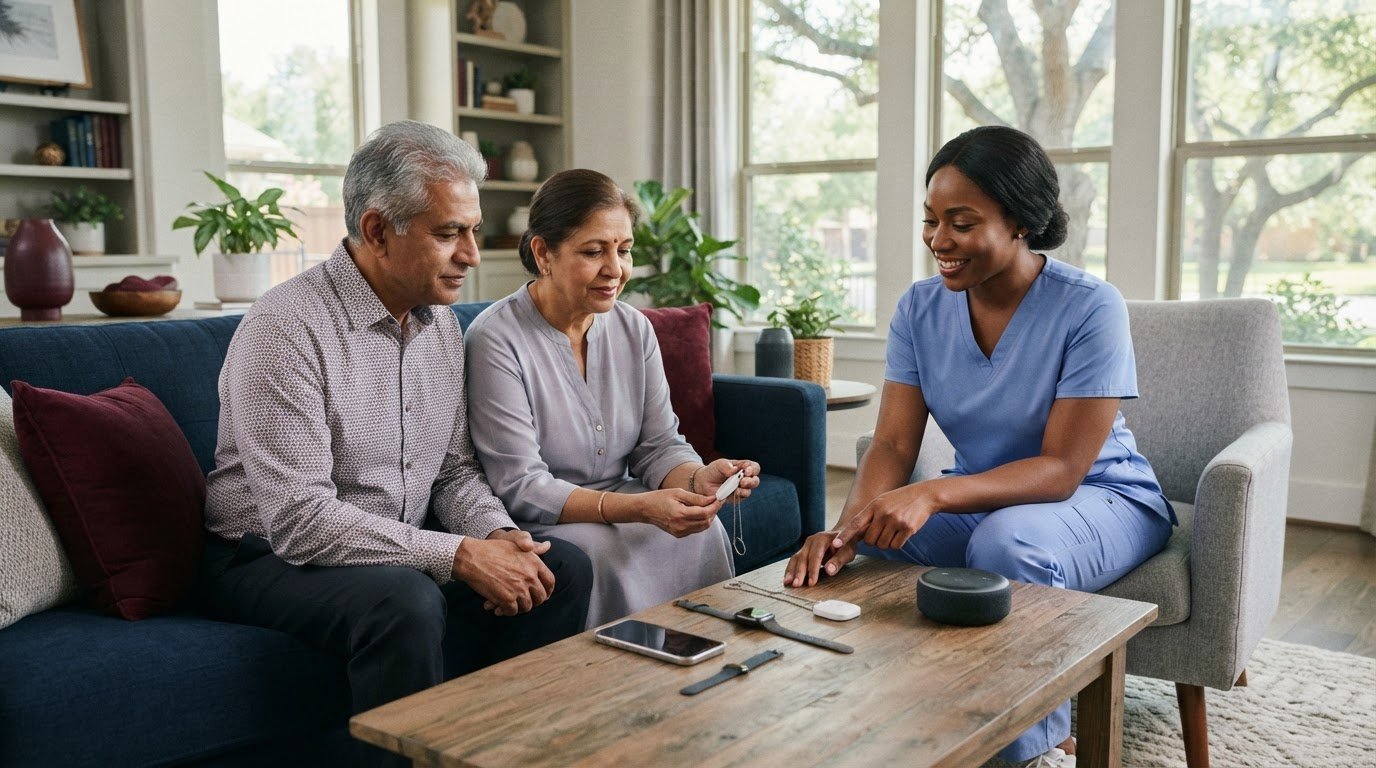
The strongest alternative to a medical alert system may be a person, not another button. A personal emergency response system alternative could be a smartphone, a smart speaker that connects to 911 or designated contacts when activated, or a planned check-in with someone the user trusts. Medical alert systems, by contrast, are devices designed to connect a person calling for help with a response service.
It makes sense to compare more than the device itself. The right choice depends on how the person can call for help, who can respond, and what ongoing fees or contract terms apply.
This guide explains how medical alert systems work and compares common alternatives by cost structure, contracts, features, and live-person support. You’ll also learn why around-the-clock access to a real person can matter, and how to weigh that against options that rely on personal contacts or calls the user must initiate.
Key Takeaways
- Compare how each option summons help, from a monitored response center to a smartphone, smartwatch, or smart speaker.
- Before choosing a system, weigh contract terms, equipment fees, included features, and whether a live person can speak with the user or caregiver 24/7.
- Consider whether the person can reliably wear, charge, and operate a phone or watch, especially when they’re away from home or need help quickly.
- When a device alone doesn’t meet everyday support needs, learn how in-home companionship and personal care can complement an emergency plan.
What is a medical alert system?
A medical alert system lets an older adult call for help with a wearable button or another connected device. A phone or smartwatch may be less dependable if it isn’t worn, charged, or easy to activate during an emergency.
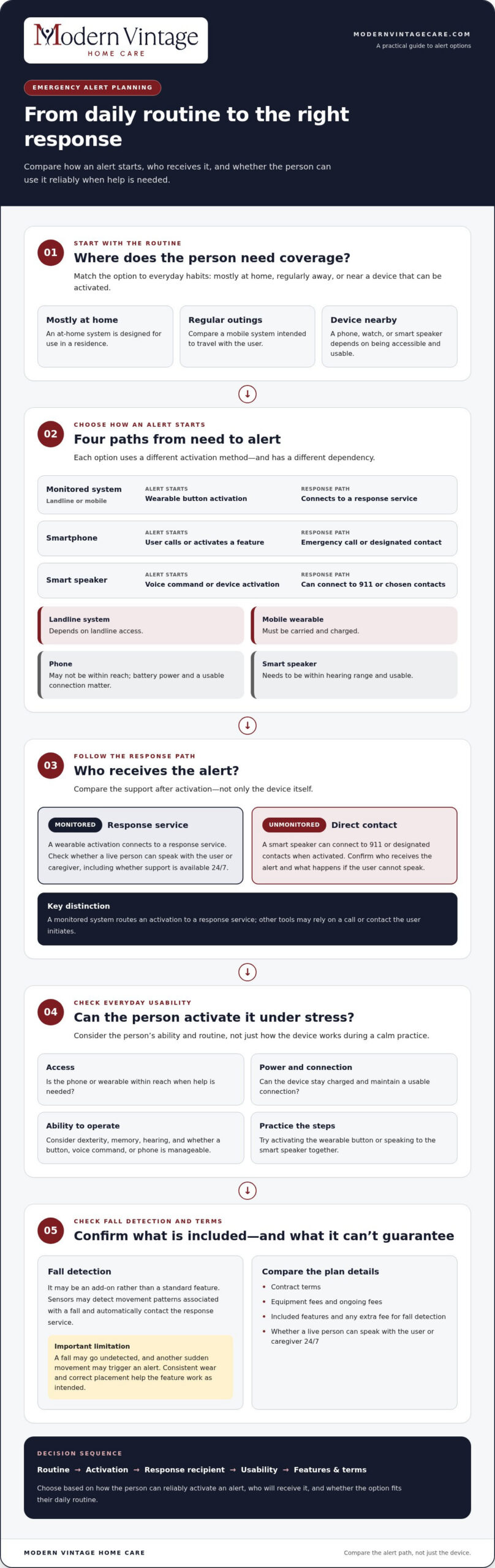
Compare how each option sends an alert, what happens after activation, and whether fall detection is included or costs extra.
Fall Detection Availability and Accuracy
Fall detection is optional on some medical alert systems, not a standard feature on every device. Sensors identify movement patterns associated with a fall and may automatically contact the response service.
Fall detection can help if someone can’t press a button, but it isn’t infallible. A fall may go undetected, while another sudden movement may trigger an alert. Wearing the device consistently and following its placement instructions helps the feature work as intended.
| Option | How an alert starts | Fall detection | Response path | Key limitation |
|---|---|---|---|---|
| Monitored system with a landline | Wearable button activation | May be an add-on | Connects to a response service | Depends on landline access |
| Monitored mobile system | Wearable button activation | May be an add-on | Connects to a response service | Must be carried and charged |
| Smartphone | User calls or activates a feature | Depends on the phone | Emergency call or designated contact | May not be within reach |
| Smart speaker | Voice command or device activation | Not inherent to the option | Can connect to 911 or designated contacts when activated | Needs to be within hearing range |
Choose an option based on how the person can reliably activate an alert and who will receive it.
Smartphones as Alert System Alternatives
A smartphone can be an alternative if the user keeps it nearby and can call emergency services or contact a caregiver. Unlike a wearable medical alert system, it may require finding the phone, unlocking it, and completing an activation step. If the person falls out of reach of the phone, they may be unable to call.
Smartphones also rely on battery power and a usable connection. Consider whether the older adult can operate the device under stress, not just during a calm practice. A phone can supplement an alert plan, but its usefulness depends on access and ease of use.
For a practical comparison, test the activation process, confirm whether a live response service receives alerts, and account for any extra monthly fee for fall detection. A landline-based unit, mobile wearable, and smartphone each suit different routines and needs.
Medical alert system alternatives and product comparisons
Compare each option by where it works, how an alert starts, and who receives it. The best fit depends on the person’s routine, ability to activate a device, and need for an automatic response.
At-Home and Mobile Alert Options
An at-home alert system is designed for use in a residence, while a mobile system is meant to travel with the user. A home unit may suit someone who spends most of the day indoors; a mobile device may fit someone who regularly leaves home for errands or visits.
Compare the alert path, not just the device. A monitored system connects an activation to a response service, while an unmonitored smart speaker can connect directly to 911 or designated contacts when activated. Ask who receives an alert and what happens if the user can’t speak.
| Option | Best matched routine | Alert path | Key comparison |
|---|---|---|---|
| At-home system | Mostly at home | Monitored response service | Home coverage |
| Mobile system | Regular outings | Monitored response service | Use away from home |
| Smart speaker | Within hearing range | 911 or designated contacts | Direct activation |
| Phone or watch | Device carried and charged | User-activated call or feature | Ease of use |
Medical Alert Brands and Alternatives
Life Alert is one medical alert option, but a familiar brand isn’t automatically the right match. Compare it with other monitored systems and unmonitored tools by service type, equipment, contract terms, and included features. Don’t assume every brand works the same way.
Consider alternatives if the person wants a different alert method, needs coverage beyond the home, or prefers designated contacts over a response service. A smart speaker, for example, can reach 911 or chosen contacts when activated, but it relies on being nearby and usable.
Choosing for Individual Needs
Start with the person’s actual routine. If they spend most of their time at home, an at-home unit may fit; if they often go out, compare mobile coverage. Then consider dexterity, memory, and hearing, as well as whether the user can press a button, use a voice command, or operate a phone.
Include loved ones in the decision, especially if they’ll receive alerts or help with setup. Practice activating the device together, such as pressing a wearable button or speaking to a smart speaker. This helps reveal whether the steps feel manageable during a stressful moment.
Insurance Coverage for Devices and Alternatives
Coverage for medical alert systems may vary by plan and circumstances. Medicaid and private insurance don’t have one universal coverage rule for these devices. Coverage depends on the specific program or policy and its benefits.
Distinguish device coverage from other support. A medical alert system is designed to send an emergency signal, while an automated check-in can prompt a response if someone misses a scheduled contact. Compare what each service does before treating one as a substitute for the other.
To create a practical shortlist, compare home-only, mobile, and unmonitored options against the person’s daily routine, alert recipient, and ability to activate the device. These personal emergency response system alternatives differ most in where they work and who responds.
Trial periods, equipment fees, and contracts
Compare the full commitment, not just the advertised monthly charge.
Subscriptions and Equipment Costs
A monthly subscription usually pays for monitoring, while equipment may involve a separate charge, rental, or included device. Add any equipment charge, activation fee, shipping, or optional feature listed in the offer.
Bay Alarm Medical and Medical Guardian are names to compare, but their equipment and features may differ. For either brand, separate the device cost from monitoring, then note whether a battery, charger, or replacement equipment affects the total. A written cost breakdown makes side-by-side comparisons clearer.
Free or Low-Cost Emergency Response Options
Lower-cost alternatives may rely on existing tools and personal contacts instead of paid monitoring. For example, a household can arrange scheduled check-ins by phone, or use a smart speaker that connects directly to 911 or designated contacts when activated. These approaches avoid comparing a dedicated monitoring subscription, but the response depends on the person activating the device or contacts following the plan.
Before choosing, write down who receives each alert and what they’ll do next. A call to a loved one differs from a monitored service because the contact must be available and able to respond. Compare the practical response plan, not only the monthly charge.
| Cost or contract detail | What to compare | Why it matters |
|---|---|---|
| Monthly monitoring | Recurring charge and included response | Shows the ongoing commitment |
| Equipment | Purchase, rental, or included device | Changes the upfront and replacement costs |
| Trial period | Length, refund terms, and return steps | Defines how cancellation works during the trial |
| Contract | Term, renewal, cancellation, and final charges | Clarifies what happens if needs change |
| Discounts | Eligibility and whether savings continue | Shows the charge after any offer ends |
Read the trial terms before activation. Note the deadline, required return condition, and cancellation process. A device left active may continue to accrue charges under its agreement. Also distinguish a trial from a contract term, since they describe different parts of the purchase.
For Bay Alarm Medical or Medical Guardian, compare the same categories instead of relying on a headline offer. Write down monthly monitoring, equipment, activation, shipping, discounts, and cancellation terms. If an option uses a smart speaker or scheduled calls, compare its setup and response plan rather than treating it as equivalent to monitored service.
Features to compare when choosing a system
Compare the full alert path, from activation to the person or service receiving the signal. A wearable button, cellular connection, and live response can each affect whether a system fits the user’s routine.
Start with the connection type. A home unit may use a landline, while a mobile device may use a cellular connection. The right choice depends on where the user spends time and whether the signal works there. For example, someone who walks outside daily needs an option that travels with them, unlike a home-only device.
Next, look at who receives an alert. A monitored system should make clear whether a live person can speak with the user or caregiver 24/7. That conversation can help establish what happened and what response is needed. An unmonitored device may instead contact chosen people or emergency services when activated.
Some systems can include temperature and air quality monitors. These may be useful when environmental conditions are part of the household’s safety concerns, but they don’t replace an emergency call button. Compare each added function with the person’s actual needs instead of choosing a device simply because it offers more features.
Fit matters, too. An alert button helps only if the user wears it and can activate it. Check whether a pendant, wrist button, or smartwatch feels comfortable during normal activities and whether its controls are easy to find. A familiar watch may feel natural, while a separate pendant may be easier to identify quickly.
- Test activation: Have the user press the button or use a voice command, then note whether the steps feel manageable.
- Review charging: Identify who will charge a mobile device and how the user will notice a low battery.
- Check coverage: Match the connection type to the user’s home and usual destinations.
- Confirm the response path: Name the people or service that receives an alert and decide what happens next.
For adults with memory or dexterity challenges, ask them to demonstrate activation without coaching. If they can’t find a button or remember a sequence, a simpler control may be more practical. Caregivers can observe the test and notice obstacles the user may not mention.
Finally, compare customer service, battery needs, and environmental sensors alongside the device itself. A system with many features may still be a poor fit if the user won’t wear it or can’t operate it. Choose an option that matches the person’s daily habits and provides a clear route from alert to response.
Can a smartphone or smartwatch replace a medical alert system for seniors?
A smartphone or smartwatch can be a practical alert option if the older adult carries it, keeps it charged, and can activate it under stress. It may not replace a monitored medical alert system if the user needs a live person to answer or might be unable to reach a device after a fall.
Start with the alert path. A phone may let the user call emergency services or a loved one, while a smartwatch may have its own emergency features. Functions vary by device and setup, so test the specific phone or watch rather than assuming every model works alike.
Then consider access. A phone left on a kitchen counter won’t help during a fall in another room. A watch stays on the wrist only if the person finds it comfortable and remembers to wear it. Compare both with a wearable medical alert button designed for quick activation.
Charging is another daily task. A smartphone or smartwatch with a depleted battery can’t send an alert. Decide who will notice a low charge, where the device will charge overnight, and whether the user can reconnect it independently. A family member can observe the routine over several days.
- Practice activation: Ask the user to demonstrate an emergency call or alert without coaching.
- Check access: Test whether the device is within reach in the bedroom, bathroom, and usual living areas.
- Review recipients: Confirm which loved one or service receives an alert and who responds first.
- Assess charging: Build charging into a familiar routine, such as placing the phone beside the bed.
Compare fall detection separately. Some medical alert systems offer it as an add-on, but don’t assume a smartphone or smartwatch provides the same feature or response path. Read the device’s functions and test how an alert reaches its recipient. Fall detection doesn’t replace a way to call for help manually.
Live support can be a deciding difference. For a medical alert system, look for customer service that lets a live person speak with the user or caregiver 24/7. A personal phone call depends on the user’s ability to place it and the contact’s ability to answer.
Choose a phone or watch as the primary option only if the user can reliably wear or carry it, charge it, and operate it. If any step is difficult, compare it with a dedicated alert device or use the phone as a backup. Practice the chosen plan with the user and caregivers, then clarify who acts when an alert arrives.
Modern Vintage Home Care: Alzheimer’s & Dementia Care
A medical alert device can summon help, but it doesn’t provide ongoing support with daily routines. If memory changes make it harder to use an alert button consistently, Alzheimer’s & Dementia Care may better address the day-to-day needs behind the safety concern.
Modern Vintage Home Care provides Alzheimer’s & Dementia Care, Companionship, and Personal Care in Sugar Land, Missouri City, and SW Houston. These services support familiar routines and personal needs while helping families consider what assistance fits their loved one. Companionship can also bring meaningful social connection into everyday life.
If you’re considering in-home support alongside an emergency plan, contact Modern Vintage Home Care to discuss care needs.
Build a Support Plan That Fits Daily Life
Choosing among personal emergency response system alternatives is one part of supporting an older adult’s independence. Consider how the person’s needs may change over time and whether technology alone can support their daily routine. A device can provide a way to signal for help, while familiar, person-centered care can support comfort and connection at home.
When memory changes affect everyday routines, Alzheimer’s & Dementia Care may provide more tailored support. Modern Vintage Home Care also offers 24-Hour Care and Companionship, helping families explore care that fits their loved one’s needs and preserves meaningful daily interactions.
If you’re considering support alongside an alert device, contact Modern Vintage Home Care to discuss your family’s needs. A thoughtful plan can bring technology and human connection together, while keeping your loved one’s dignity at the center.
Frequently Asked Questions
What type of device is best?
The best device is one the person can use consistently in everyday life. For someone who stays home and can press a pendant button, a home-based unit may be practical. Someone who regularly goes out may prefer a mobile device. Consider comfort, hearing, vision, dexterity, memory, and who should receive an alert. A practice run can show whether the controls are easy to find and operate.
What are the main alternatives to a personal emergency response system?
Common personal emergency response system alternatives include smartphones, smartwatches, smart speakers, and scheduled calls with family or friends. Each works differently: a speaker can connect to 911 or chosen contacts when activated, while a scheduled call depends on someone noticing a missed check-in. These options can suit people with reliable access to a device and a clear response plan. They may not provide the same monitored response path.
How do medical alert watches compare with traditional medical alert systems?
A medical alert watch combines an alert function with a watch-style device, while a traditional system often uses a separate pendant or wrist button. A watch may feel more familiar to someone who already wears one, but small controls can be harder to operate. Compare how each device sends alerts, its charging routine, and whether a caregiver can help configure it. Try the actual controls before relying on either option.
How much do medical alert alternatives cost in the United States?
A smartphone or smart speaker may use equipment the household already owns, but related service or setup costs depend on the existing plan and device. Medicare doesn’t cover medical alert systems. Medicaid and private insurance coverage depends on the specific program or policy.
How do fall detection devices and apps work, and how accurate are they?
Fall detection uses device sensors to recognize movement patterns associated with a fall, then may send an alert automatically. It can help if the person can’t press a button, but may miss a fall or trigger an alert during another movement. Apps and watches can differ in how they detect and route alerts. Test the alert path, keep manual activation available, and ensure the device is worn as designed.
What should you consider when choosing an emergency response option for someone who lives alone?
Consider how the person will call for help, who receives an alert, and what happens if they don’t respond. For example, a relative can be the first contact, with a clear backup plan if they’re unavailable. Check that the device is accessible in the rooms the person uses, and account for charging or wearing habits. Families in Sugar Land, Missouri City, and SW Houston can also consider whether regular companionship or memory care support would help with daily routines.